SEE TIME LEFT IN MEETINGS
See time left in meetings on Mac and iPhone
On Mac, Interval keeps start and end countdowns, one-click join and overlaps at the edge of your screen. On iPhone, see time left with Live Activities and record in-person calendar meetings with Interval Pro when needed.
Website lifetime access · £15.99 once · Two Macs · macOS 26+
Pay before download. Changed your mind? You can request a refund within 14 days of your website purchase, including after download or activation (terms).
The Edge · a 30-second film with fictional meetings, music and sound effects. Captions and a readable sequence.
- Apple Calendar
- Zoom, Meet, Teams, Webex & FaceTime links
- Read-only & on-device
TRY IT ON THIS PAGE
Press the buttons.
It’s the real layout.
Switch between a meeting, its notes and the wrap-up, extend the timer and edit the example note. Nothing leaves this page.
More listening.INTERVAL / FOR MAC
01 / A QUIETER WAY TO MEET
A meeting timer
at the edge of your Mac.
Meet the small companion at the edge of your screen.
Open it
when you need it. Let it fold away when you don’t.
Choose your calendars.
Grant read access and pick the Apple Calendar calendars you want in your day. Interval never edits events or invitations.
Starts and endings, in view.
See when your next meeting starts and how long this one has left. Keep the countdown at the edge of your Mac.
Put it on any edge.
Slide Interval to the left, right, top or bottom of your screen, then fold it into a compact timer when you want the space.
02 / FROM INVITE TO WRAP-UP
Every meeting,
minute by minute.
Interval follows each meeting in your selected calendars, before, during and after the call, so you never have to open Calendar to check the time.
-
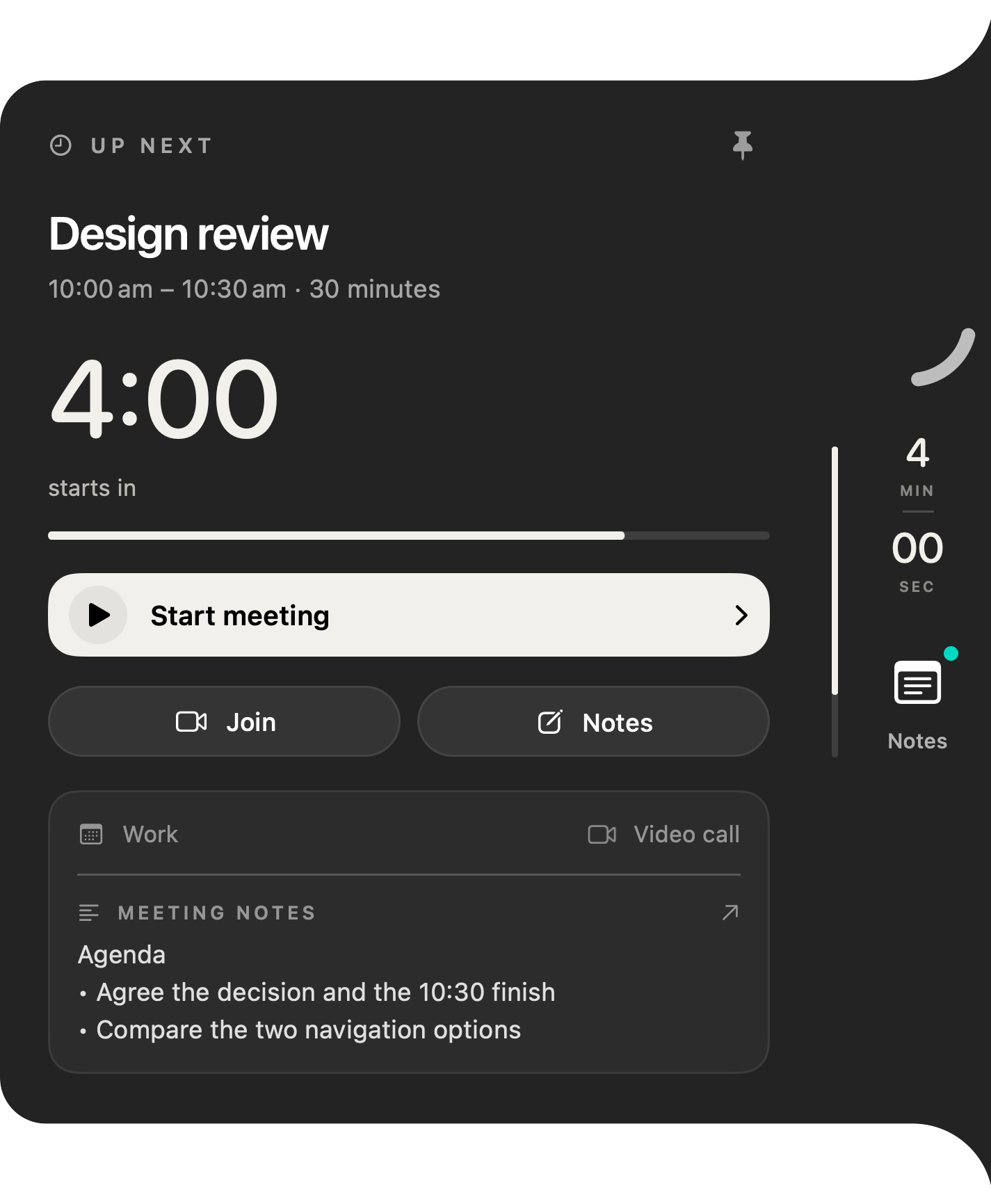
Before it starts
Know when to join.
Inside the preparation window you choose, Interval counts down to the start. When it’s time, open the meeting’s Zoom, Google Meet, Microsoft Teams, Webex or FaceTime link from the panel.
-
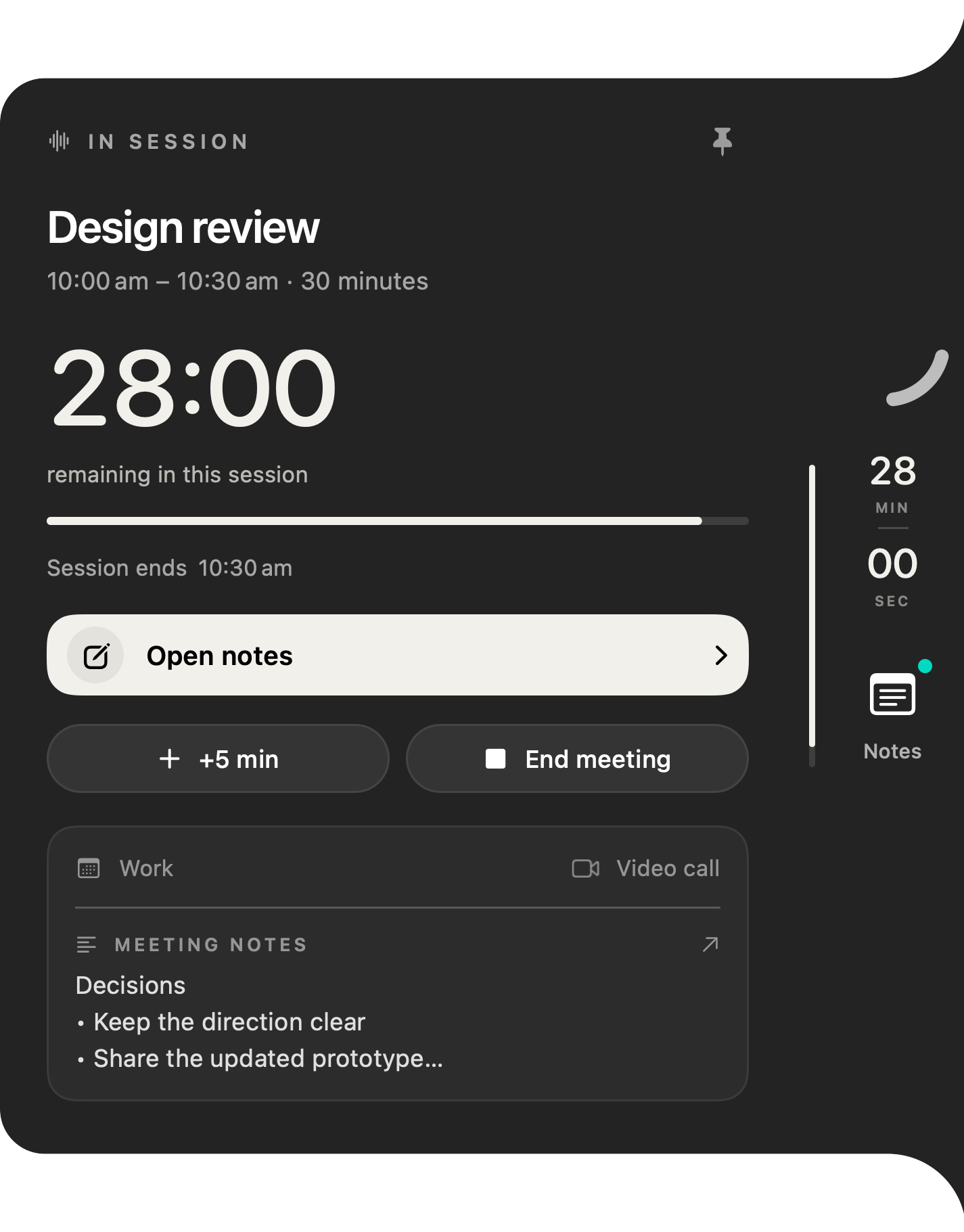
During the call
See exactly how long is left.
The time remaining stays at the edge of your screen. Running long? Add five minutes to your personal timer without changing the calendar invitation.
-
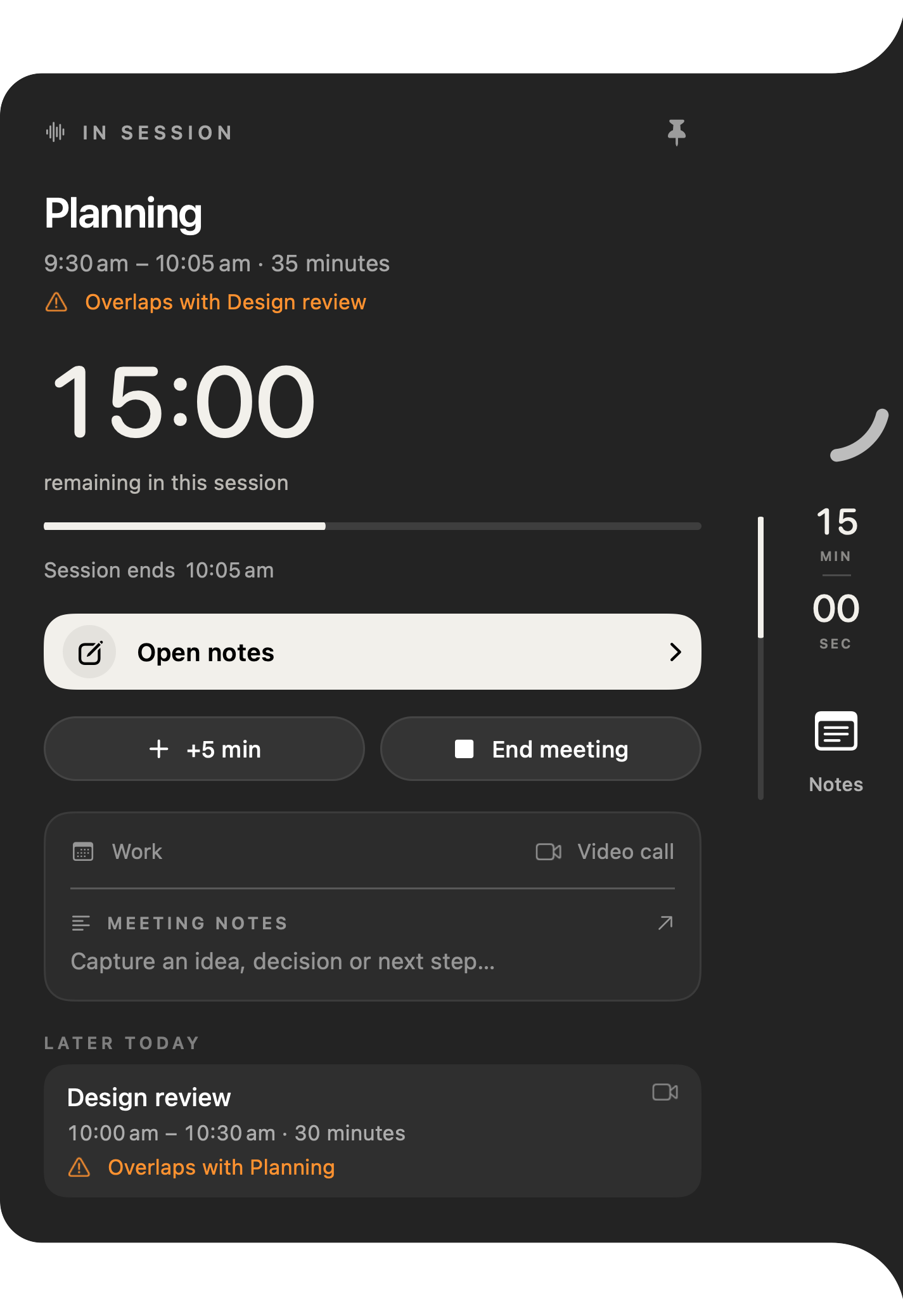
When plans collide
Spot the overlap.
When meetings in your selected calendars overlap, an orange “Overlaps with…” warning appears beside the meeting, with the rest of your day listed below.
-
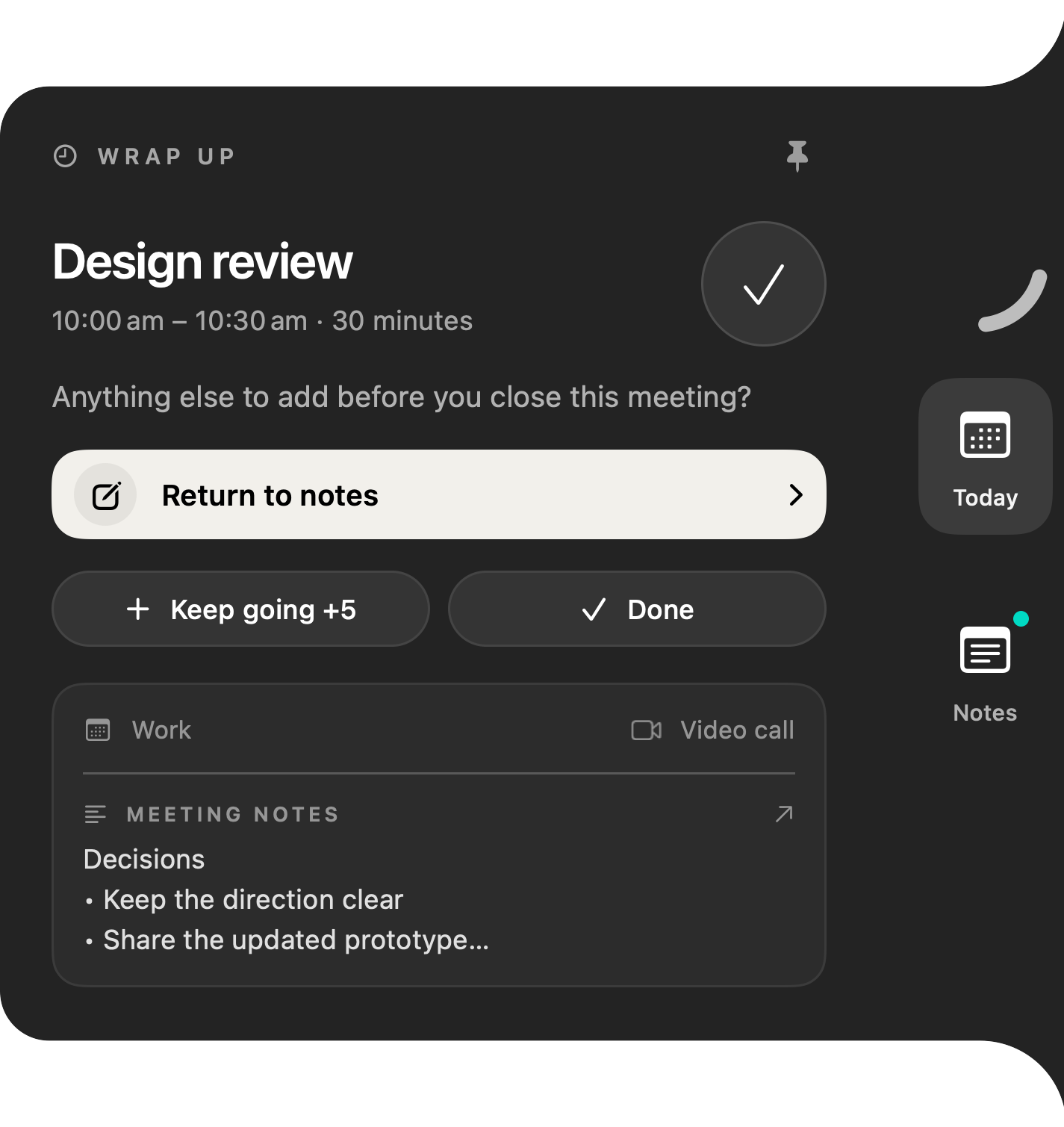
As time runs out
Wrap up on purpose.
When the meeting reaches its end, Interval asks if there’s anything else to add. Return to your notes, keep going for five more minutes, or mark it done.
-
Between calls
Fold it out of the way.
Fold Interval into a compact timer on any edge of your screen, and open it again when you need the details.
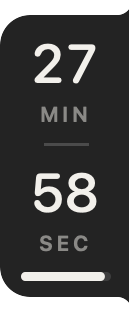
Current native views with fictional example meetings. Set up your meeting view.
Good thoughts.
Safely kept.
Decisions
Next steps
03 / SUPPORTING NOTES
Keep decisions
with the meeting.
When a decision needs saving, write a quick note beside the timer. Notes support the meeting workflow and stay in your notebook for later.
- Bullets & checklists
- A searchable notebook for later
- Export & optional iCloud sync
- Write and edit your own notes
IPHONE / APP STORE
Interval on iPhone
Your meetings, a timer and notes on iPhone, with an in-person recorder when you need one.
Know what's next
See upcoming meetings, a preparation countdown and time left, including Live Activities.
Keep notes
Write notes beside each meeting, with optional private iCloud sync.
Record in person
Record a current in-person calendar meeting with your iPhone's microphone and transcribe it on-device, up to an hour. How to record an in-person meeting on iPhone.
Interval Pro
Full access needs Interval Pro. A 7-day free trial is available to eligible new subscribers.
It doesn't record phone calls, audio from other apps or voice memos, and it isn't an all-day recorder.
04 / PRIVATE BY DESIGN
Your calendar stays yours.
Interval reads. It never writes.
-
Read-only calendar access
Interval reads only the calendars you select. It never edits events or invitations, and you can revoke access at any time in your device settings.
-
Processed on your device
Event titles, times and meeting links are processed on your device to power the panel, countdowns and reminders.
-
Recording stays optional
Manual notes remain available. On Mac, recording captures your microphone and Mac audio only when you start it. On iPhone, it captures nearby speech during a current calendar meeting. Transcription runs on the recording device.
-
No Interval account
No sign-up, no advertising network and no cross-app tracking. Notes save on your device first; iCloud sync is optional.
05 / INTERVAL AT A GLANCE
The short version.
Interval is a native meeting timer for Mac and iPhone. It reads the calendars you choose. On Mac, a screen-edge panel shows your next meeting, countdowns and overlaps. On iPhone, the timer, notes and Live Activities keep the meeting in view.
- Made for
- People who spend their day on video calls and want to join on time, finish on time and see clashes before they happen.
- Calendars
- Any calendar available in Apple Calendar on your Mac, with your permission. Read-only.
- Call links
- Supported Zoom, Google Meet, Microsoft Teams, Webex and FaceTime links in event details.
- Notes
- Optional manual notes with bullets, checklists, a searchable notebook, export and optional iCloud sync.
- Price
- Mac website lifetime access is £15.99 once for two Macs, with automatic updates. Mac and iPhone are also available through App Store Pro.
- Requires
- macOS 26 or later on Mac, or iOS 26 or later on iPhone.
- Mac 1.2 update
- Opt-in recording and local transcription. Mac 1.2 is on the Mac App Store; the website download is Mac 1.1. Draft notes need supported Apple Intelligence.
- Not included
- Automatic rescheduling or time tracking.
- Made by
- Cory Parry, an independent developer trading as Interval.
Interval is a great fit if you…
- Spend much of the day on Zoom, Google Meet, Teams, Webex or FaceTime
- Keep your meetings in calendars that appear in Apple Calendar
- Want to join on time and finish on time without watching the clock
- Prefer paying once for Mac website access
- Want the same meeting timer and notes on your iPhone
Look elsewhere if you need…
- Unattended recording or guaranteed AI summaries on every Mac
- Recording phone calls or all-day conversations
- Automatic scheduling or rescheduling
- Time tracking or billable-hours reports
- A shared room or agenda timer for a whole team, Windows or Android
06 / PRICING
Two ways to get Interval.
Choose the one that fits.
The website version has no subscription. Pay once, then download Interval and activate it on your Macs with the key we email you.
Mac and iPhone: App Store. Free download; Interval Pro £4.99/month or £39.99/year in the UK, with a 7-day free trial for eligible new subscribers. Apple shows local pricing before purchase. Get Interval on the App Store. Website and App Store purchases are separate.
Interval for Mac
Mac: website lifetime
£15.99once
Currency is chosen automatically for your country. You can change it above.
- Lifetime access, no renewals
- One licence covers two Macs
- Mac only. Doesn't include iPhone.
- Automatic app updates included
- Activation key emailed after payment
- Requires macOS 26 or later
Pay before download. Changed your mind? You can request a refund within 14 days of your website purchase, including after download or activation (terms).
| Choose currency | One-time lifetime prices |
|---|---|
| GBP | £15.99 |
| USD | US$19.99 |
| EUR | €19.99 |
| AUD | A$29.99 |
These are the four supported checkout currencies. Outside these regions, including Canada, choose any supported currency; your bank may convert it and charge a fee.
PRACTICAL MEETING GUIDES
Make more room in your meeting day.
How to keep meetings on time on your Mac
Agree an end time, leave space for decisions and keep a personal countdown visible during the call.
Use a meeting countdown alongside Apple Calendar
Connect selected Mac calendars, check permission and keep meeting time visible beside your call.
Capture decisions and next steps beside your meeting timer
Write manual meeting notes beside a Mac countdown, find them later and export the text.
A practical Mac workflow for a day full of meetings
Use Calendar for commitments, a task manager for actions and a visible meeting timer for the call itself.
Use Google or Outlook calendars with a Mac meeting timer
Make your calendar events visible in Apple Calendar, then select them in Interval for a meeting countdown.
Join Zoom, Google Meet and Teams calls from your Mac calendar
Find supported meeting links beside a Mac countdown, and check what to do when the join action is missing.
Meeting reminders for ADHD and time blindness on a Mac
Compare visible countdowns and full-screen reminders, with free Calendar fixes to try first.
The best meeting timer apps for Mac, grouped by the job you need done
Compare Mac meeting timers by job: joining on time, full-screen alerts, notch countdowns and keeping the current call on time.
How to see how much time is left in your meeting on a Mac
Built-in Zoom, Teams and Meet timers, and a screen-edge countdown to the end of every calendar call.
Interval vs MeetingBar: a Mac meeting timer for when a join button isn’t enough
MeetingBar's free menu-bar countdown next to Interval's screen-edge timer, notes and overlap warnings.
A Pocket AI alternative without the device: when your iPhone is enough, and when it isn't
Where iPhone meeting recording fits and where Pocket hardware makes more sense.
How to see a meeting countdown on iPhone
Count down to your next meeting and see time left once it starts.
Compare meeting apps
All comparisonsSee how Interval compares with five other Mac apps, from where the timer lives to what you pay.
Scroll sideways to compare all six apps →
| What matters | IntervalYour meeting companion | MeetingBar | In Your Face | Loon | Dato | Fantastical |
|---|---|---|---|---|---|---|
| Main interface | Screen-edge meeting panel | Menu-bar meeting list | Full-screen reminders | Meeting alerts and focus blocks | Menu-bar calendar and world clocks | Full calendar and scheduling |
| Price | £15.99 onceWebsite licence · two Macs | FreeOpen source | US$69 onceDirect desktop licence; or US$3.99/month, US$24.99/year | $4.99/monthOr $3.99/month billed annually | $18 once | Free tierPremium: £6.99/month or £5/month billed annually |
| Try before buying | 14-day refundIncluding after activation | Free to use | Limited free alerts | 7-day trial | Free website trial | 14-day Premium trial |
| Time left in a meeting | YesPersonal screen-edge countdown to the calendar end time | YesActive-event end countdown in the menu bar | NoClosest: next-meeting countdown in desktop widgets | NoClosest: next-meeting start countdown and a separate focus timer | NoClosest: upcoming-event display and full-screen start alerts | YesOptional current-item remaining time in the menu bar |
| Meeting links | Zoom, Meet, Teams, Webex and FaceTime | 50+ supported meeting services | Join from alerts or event list; includes Zoom, Meet and Teams | One-click Zoom, Meet and WebexTeams links shown without one-click joining | 50+ supported services, including Zoom, Meet and Teams | Quick join for Zoom, Meet, Teams, Webex, FaceTime and more |
| Meeting transcription | Yes — private, on-deviceOpt-in recording; no meeting bot. Supported devices and languages. Requirements and privacy | NoCalendar awareness and call joining. Official features | NoMeeting reminders and direct call joining. Official features | NoClosest: manual task lists in focus sessions. Official features | NoClosest: existing calendar-event notes. Official features | No built-inClosest: Apple Quick Notes links and external Zoom AI Companion summaries. |
| macOS | 26+ | 12+ | 14+Maker’s Mac download | 13+ | 26+Current App Store version; older website builds available | 12.4+ |
Prices use the currencies shown by each maker and may vary by region. Interval’s price and refund terms above apply to its website licence; App Store offers differ. Built-in Mac features are compared using current published functionality; MeetingBar’s released source was also checked. External integrations are identified separately. Interval’s audio stays on your Mac; saved transcript notes can sync to iCloud if enabled. Follow the source links for details.
What is Interval?
Interval is a meeting timer for Mac and iPhone. On Mac, a screen-edge panel shows upcoming meetings, countdowns and overlaps. On iPhone, it shows a timer, notes and Live Activities. Both use the calendars you select without changing events.
Is Interval a good MeetingBar alternative?
Yes, if you want a paid screen-edge panel with start and end countdowns, “Overlaps with…” warnings and notes beside the timer. MeetingBar is free and open source, joins 50+ services and also counts down during active events. Keep MeetingBar if a menu-bar join is all you need. Compare the workflows in our MeetingBar alternative guide.
Can I see how much time is left in my Zoom, Teams or Meet call?
Yes. Zoom has a Time Remaining timer for scheduled meetings; Teams shows a banner five minutes before the end. Google Meet has a shared timer under Meeting tools, controlled by hosts and co-hosts. Interval shows your calendar end-time countdown at the screen edge across supported calls. Choose built-in tools if they suffice; compare ways to see time left in a meeting.
Is Interval a one-time purchase?
Yes, for the Mac website licence. Lifetime access costs £15.99 once for two Macs, with no renewal, and does not include iPhone. App Store access for Mac and iPhone uses Interval Pro. You can request a refund within 14 days of your website purchase, including after activation. Compare one-time-purchase meeting apps for Mac.
Can Interval show overlapping meetings?
Yes. An orange “Overlaps with…” warning appears beside conflicting meetings in your selected calendars, with later meetings listed so you can see what comes next. Interval does not reschedule anything. Choose a scheduling tool if you need conflicts resolved automatically. Our guide explains how to spot double-booked meetings on Mac.
How do I stop meetings running over on my Mac?
Agree a finish time and the one decision you need, keep the last minutes for next steps, and keep a visible countdown. Interval’s +5 min extends only your own timer; it does not change the calendar invitation. Choose a shared timer if everyone needs the same clock. Follow our guide to keeping meetings from running over.
Does it work with my calendar?
Interval works with calendars available through Apple Calendar, with your permission. Supported meeting links let you jump into your call from the app.
Does Interval work with Google Calendar or Outlook?
Interval doesn’t have its own Google or Outlook sign-in. It reads the calendars macOS makes available in Apple Calendar, so if your Google or Outlook account’s events appear in Apple Calendar on your Mac, you can select those calendars in Interval. Check your events there first. Read the calendar setup guide.
Which video call links does Interval support?
Interval recognises supported Zoom, Google Meet, Microsoft Teams, Webex and FaceTime links in a meeting’s event details. The join action opens the link and the call service takes it from there.
Does Interval change my calendar?
No. Interval reads the calendars you select and never edits events or invitations. Adding five minutes only extends your personal timer; the calendar invitation stays unchanged.
Does Interval record or transcribe meetings?
Yes. Mac 1.2 can record your microphone and Mac audio on-device, up to one hour, only when you start it. iPhone records nearby speech during a current in-person calendar meeting and transcribes on-device, up to one hour. It cannot record phone calls, another app's audio or voice memos. Let everyone know before recording. Recording privacy details.
Can I move the panel?
Yes. Slide Interval around the left, right, top or bottom edge of your Mac’s screen. The panel stays upright, and it folds into a compact timer when you want more space.
When can I get Interval?
Interval for Mac is available through this website and the App Store. The website lifetime licence costs £15.99 and requires macOS 26 or later. Interval for iPhone has been on the App Store since 27 October 2026 and requires iOS 26 or later.
Is Interval free?
The App Store download is free; full access needs Interval Pro at £4.99/month or £39.99/year in the UK, with a 7-day free trial for eligible new subscribers. Apple shows local pricing before purchase. Website lifetime access costs £15.99 once for two Macs. Website and App Store purchases are separate.
How many Macs can I use it on?
The website licence covers two Macs and doesn't include iPhone. You can remove an old Mac from the download page after verifying your purchase email.
Is there an Interval iPhone app?
Yes. Interval for iPhone has been on the App Store since 27 October 2026 and requires iOS 26 or later. It shows upcoming meetings, countdowns and notes, and can record and transcribe in-person calendar meetings on-device. Full access needs an Interval Pro subscription.
Does my website licence work on iPhone?
No. The £15.99 website licence provides lifetime access for two Macs. iPhone uses Interval Pro through the App Store at £4.99/month or £39.99/year in the UK, with a 7-day free trial for eligible new subscribers. Website and App Store purchases are separate.
Can Interval record phone calls on iPhone?
No. Interval records nearby speech through the iPhone microphone during a current calendar meeting, up to an hour. It cannot capture a phone call or another app's call audio on the same iPhone, and it has no voice-memo mode. Read the recording details.
Do I need a Pocket recorder for meeting notes?
No, if you only need notes from Mac calls or scheduled in-person meetings under an hour. Interval records those with the Mac or iPhone you already have. Pocket is better suited to phone calls, all-day capture and longer recordings. Compare Pocket AI and Interval.
How do I use my website purchase?
After purchase, Interval emails you a download-page link and an activation key. Paste the key on the download page and your Mac download starts automatically. Open the DMG and drag Interval to Applications. Keep the same key for activation in the app. Automatic app updates are included. Read the website purchase terms for details.
Where do my notes go?
Notes are saved on your Mac and stay available in your notebook. You can export them or turn on optional iCloud sync. Read the privacy policy for details.